
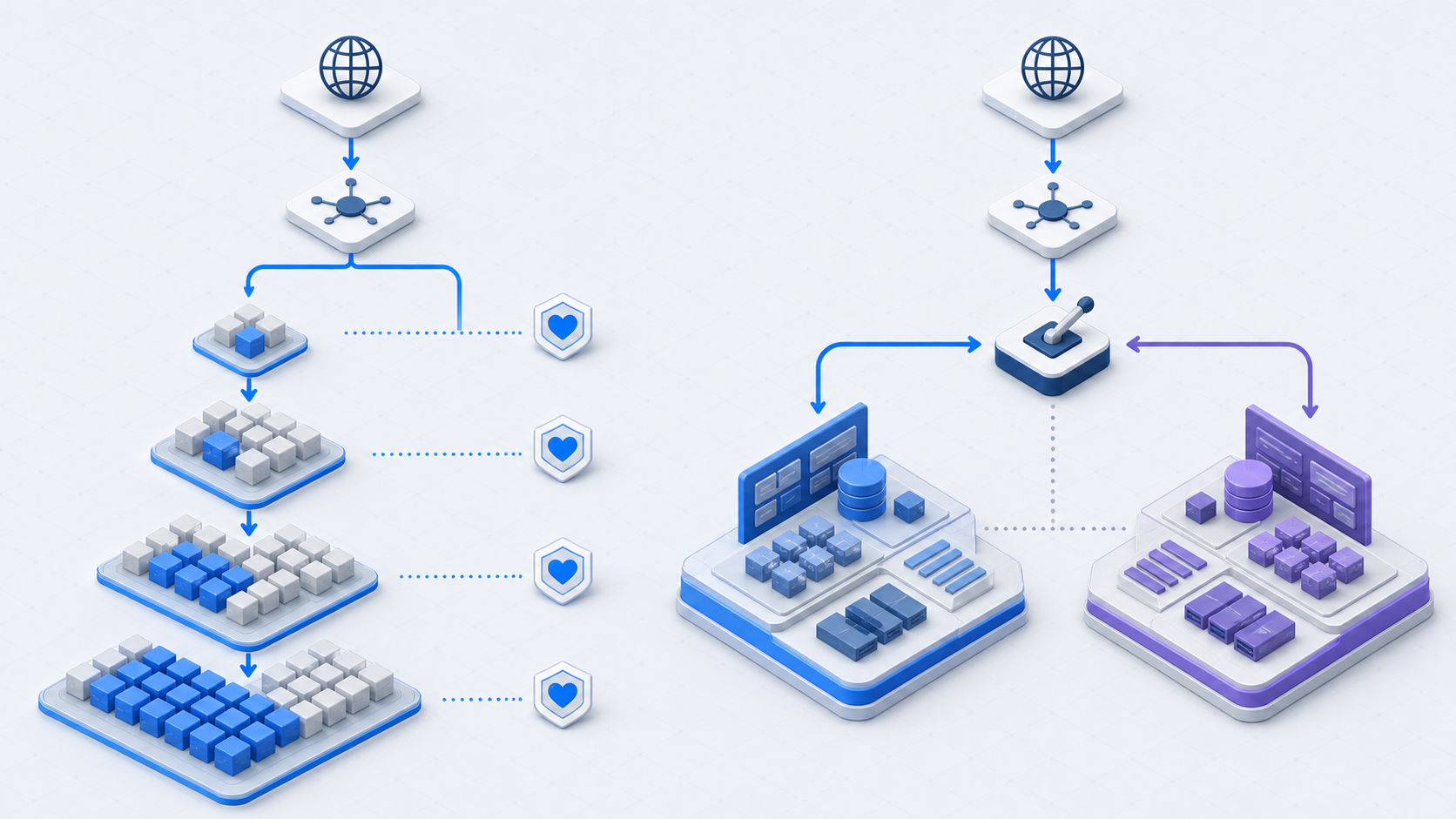
Canary and blue-green deployments both reduce release risk, but they solve different parts of the problem. A canary limits initial exposure and expands gradually. Blue-green creates a complete parallel environment and switches traffic between the old and new versions.
Neither strategy is automatically safer. The right choice depends on what must be validated, how traffic can be segmented, whether two environments can run together, and whether application, configuration, and data changes remain compatible during recovery.
The short answer
Choose canary when you need production evidence from a small cohort before expanding. Choose blue-green when you need a fully prepared parallel environment and fast traffic switching. Combine them when the release justifies both environment isolation and progressive exposure.
How canary deployment works
A canary rollout sends a controlled fraction of production exposure to the new version. Exposure can be based on request percentage, user identity, tenant, geography, device, account, or another stable attribute. The release expands only when health criteria pass.
- Deploy the new version alongside the current version.
- Route a small, representative cohort to it.
- Compare technical and business health with the baseline.
- Increase exposure through defined stages.
- Stop, roll back, or continue based on explicit gates.
Canary strengths
- Limits customer exposure while collecting real production evidence.
- Supports automated analysis at multiple rollout stages.
- Can target internal users, selected tenants, or low-risk regions first.
- Avoids allocating a complete second environment in many architectures.
Canary constraints
Old and new versions run simultaneously, so APIs, events, schemas, caches, and shared state must remain compatible. Routing needs to be stable and observable. Small cohorts may not generate enough traffic to detect rare failures, and noisy metrics can lead to false confidence or unnecessary stops.
How blue-green deployment works
Blue-green maintains two equivalent production environments. Blue typically serves live traffic while green receives the new release and validation. Once green is ready, the traffic layer switches requests to it. Blue remains available for a defined recovery period.
Blue-green strengths
- Validates a complete environment before production traffic moves.
- Provides a clear old-versus-new boundary.
- Supports rapid traffic reversion when the old environment is still compatible.
- Works well for environment-wide upgrades and immutable infrastructure patterns.
Blue-green constraints
Two environments increase compute cost and operational complexity. Environment drift can invalidate pre-switch testing. Long-lived connections, background workers, queues, caches, scheduled jobs, and stateful sessions require deliberate cutover handling. The technique does not automatically make database changes reversible.
Operational comparison
- Exposure: canary grows from a small cohort; blue-green often switches a large share at once unless traffic is gradually shifted.
- Validation: canary emphasizes live behavioral evidence; blue-green emphasizes pre-cutover environment validation.
- Infrastructure: canary needs concurrent versions; blue-green generally needs two complete environments.
- Rollback: canary removes traffic from the new version; blue-green redirects traffic to the prior environment.
- Compatibility: both may require old and new versions to coexist with shared data and dependencies.
- Operational duration: canary may take longer due to observation stages; blue-green can cut over quickly after preparation.
- Best signal: canary reveals cohort behavior over time; blue-green reveals environment correctness before cutover.
How to choose
Start from the release’s failure modes instead of an organization-wide preference.
Prefer canary when
- Business behavior must be observed with real users before full rollout.
- Traffic or customer cohorts can be isolated reliably.
- The system supports concurrent versions and backward-compatible contracts.
- Health signals are sensitive enough to evaluate small stages.
Prefer blue-green when
- The entire runtime environment changes together.
- A complete production-like environment must be verified before cutover.
- Traffic can switch cleanly and the prior environment can remain warm.
- Duplicating the environment is technically and financially practical.
When to combine them
Blue-green and canary are not mutually exclusive. Deploy the new release into green, verify infrastructure and baseline behavior, then route a small production cohort to green. Expand traffic through canary stages while blue remains available. This pattern provides a strong boundary and controlled evidence, but it also combines their complexity.
Use the combined approach for high-impact releases where the added cost is justified. Define which control addresses which risk so the architecture does not become ceremony without additional safety.
Rollback, data, and asynchronous work
Traffic reversal is only one part of recovery. Before either strategy begins, answer these questions:
- Can the old application read data written by the new version?
- Can queued messages from the new version be consumed safely after reversion?
- Will background workers run twice during overlap?
- Are sessions, caches, and connection pools portable across versions?
- Which health threshold stops expansion, and which triggers full recovery?
- How long will the prior environment or version remain available?
Choose rollout strategy per change, record the decision, and verify the complete recovery path. Canary limits who sees a problem; blue-green limits how long switching may take. Safe delivery depends on pairing either strategy with compatibility, observability, explicit gates, and coordinated recovery.